
Configuring Serialization For EasyNetQ Version 8 In C# & .NET
[C#, .NET, RabbitMQ, EasyNetQ, StarLibrary]
Yesterday’s post, “Using EasyNetQ Version 8 in C# & .NET” looked at the new, overhauled EasyNetQ package that makes working with RabbitMQ easier as it is a simpler, opinionated library.
Setting up the project to support EasyNetQ, as we saw yesterday, is as simple as adding the relevant package:
dotnet add package EasyNetQ --Version 8.2.0
We then configure the dependency injection as follows:
using EasyNetQ;

var builder = WebApplication.CreateBuilder(args);
builder.Services.AddEasyNetQ(builder.Configuration.GetConnectionString("RabbitMQ"));
var app = builder.Build();
We can then request an instance of the IBus from wherever we need one, like so:
app.MapGet("/", async (IBus bus, ILogger<Program> logger) =>
{
    try
    {
      //
      // Your logic here
      //
    }
    catch (Exception ex)
    {
        return Results.InternalServerError(ex.Message);
    }
});
Out of the box, EasyNetQ uses System.Text.Json as the Json serializer, with a bunch of defaults that are friendly to legacy clients.
If you need to, you can configure and control the serialization that will be used internally, if you:
- Want to squeeze out every last bit of performance.
- You are consuming
Jsonfrom a client or a source outside your control. - You have some advanced serialization customizations you want to leverage
- You want control over things like
nullanddefaultvalues
Take, for example, a situation where you are publishing objects for consumption by another system that is subscribed to the RabbitMQ instance.
The type is as follows:
using EasyNetQ;

[Queue("SpyQueue")]
public sealed record Spy(string FirstName, string OtherNames);
The attribute Queue allows us to specify the name of the queue the object will go into.
Let us create a sample:
var spy = new Spy("James", "Bond");
By default, this will serialize like this:
{"FirstName":"James","OtherNames":"Bond"}
The target consumer might be unable or unwilling to consume Json in this format.
Let us say the target consumer was built in Python, and it is expecting Json in snake_case.
How do we address this?
We can configure EasyNetQ in the startup, like this:
using System.Text.Json;
using EasyNetQ;

var builder = WebApplication.CreateBuilder(args);

// Set up our serialization options
var options = new JsonSerializerOptions
{
    PropertyNamingPolicy = JsonNamingPolicy.SnakeCaseLower,
    WriteIndented = true
};

// Register our DI
builder.Services.AddEasyNetQ(builder.Configuration.GetConnectionString("RabbitMQ"))
    .UseSystemTextJsonV2(options); // Set the serialization options

var app = builder.Build();

app.MapGet("/", async (IBus bus, ILogger<Program> logger) =>
{
    try
    {
        var spy = new Spy("James", "Bond");

        logger.LogInformation("Publishing message ...");

        // Publish a message
        await bus.SendReceive.SendAsync("SpyQueue", spy);

        // Return OK
        return Results.Ok();
    }
    catch (Exception ex)
    {
        return Results.InternalServerError(ex.Message);
    }
});

await app.RunAsync();
Here we are using Send, rather than Publish, because I don’t want the bother of setting up subscribers.
We can then log in to RabbitMQ to view the message that we have just sent.
To get RabbitMQ up and running, I use Docker with the following docker-compose.yaml:
services:
  rabbitmq:
    image: rabbitmq:management-alpine
    container_name: rabbitmq
    restart: always
    volumes:
      - ./rabbitmq.conf:/etc/rabbitmq/rabbitmq.conf
    environment:
      - TZ=Africa/Nairobi
    ports:
      - 5672:5672
      - 15672:15672
The rabbitmq.conf file that I use to configure the container is as follows:
default_user = test
default_pass = test
The admin URL should be http://localhost:15672/
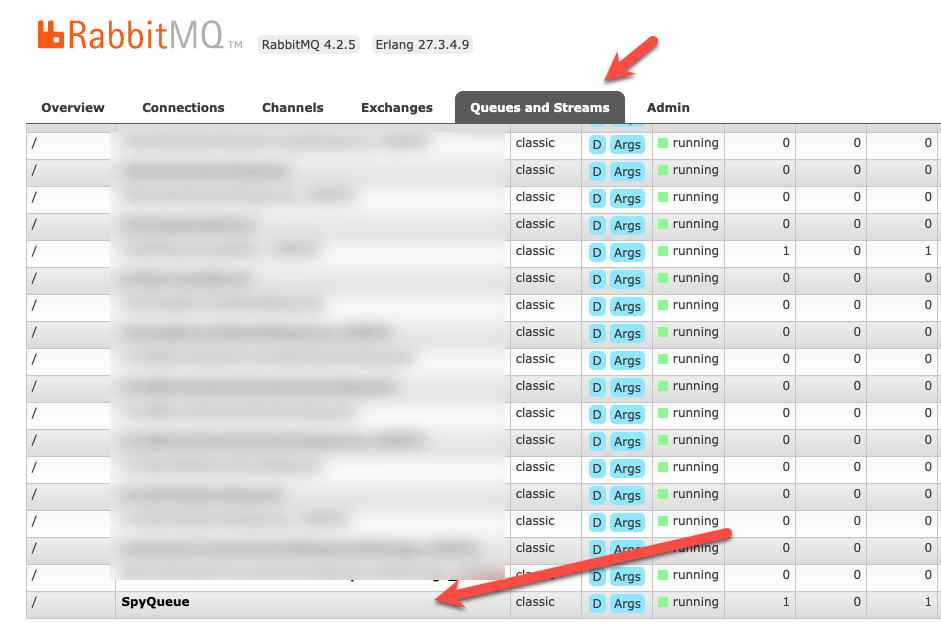
We can then click on the queue name to navigate to access it.
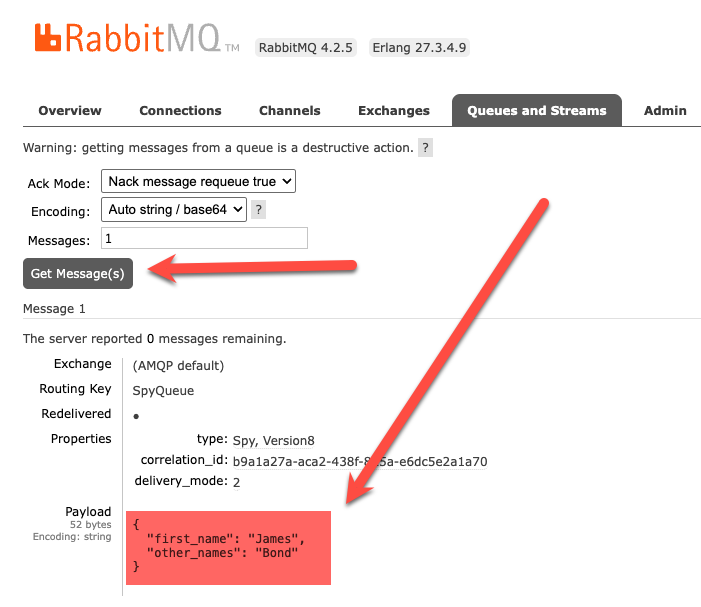
Click Get Message to view the popped RabbitMQ message.
You can see here that it is snake_case.
TLDR
You can control the serialization that will be used to send, request, or publish messages to RabbitMQ.
The code is in my GitHub.
Happy hacking!