
How To Zip Multiple Files In C# & .NET
[C#, .NET, Compression]
In an earlier post, How To Zip A Single File In C# & .NET, we looked at how to use the ZipFile class in the System.IO.Compression namespace to create a zip file from a single file.
In this post, we will look at how to zip multiple files into a single zip file.
For our example, we have a bunch of classic books in text file format.

We will include this folder in the top level of our project, like so:
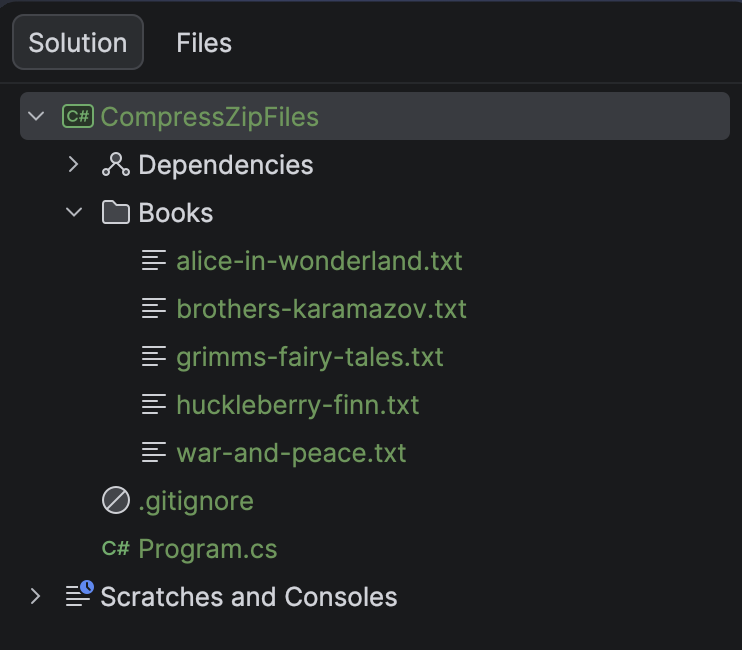
To make sure we copy the directory Books to the output directory, as well as its files, we amend the .csproj to add the following entry:
<ItemGroup>
  <None Include="Books\**\*">
  	<CopyToOutputDirectory>PreserveNewest</CopyToOutputDirectory>
  </None>
</ItemGroup>
Next, we write the code.
using System.IO.Compression;
using System.Reflection;
using Serilog;

Log.Logger = new LoggerConfiguration()
    .WriteTo.Console().CreateLogger();

// Extract the current folder where the executable is running
var currentFolder = Path.GetDirectoryName(Assembly.GetExecutingAssembly().Location);

// Construct the full path to the source files
var folderWithBooks = Path.Combine(currentFolder!, "Books");

// Construct the full path to the zip file
var targetZipFile = Path.Combine(folderWithBooks, "Books.zip");

// Retrieve the files
var filesToZip = Directory.GetFiles(folderWithBooks);

// Create the zip file on disk
await using (var archive = ZipFile.Open(targetZipFile, ZipArchiveMode.Create))
{
    foreach (var file in filesToZip)
    {
        // Add each file to the zip file as an entry, with max compression
        await archive.CreateEntryFromFileAsync(file, Path.GetFileName(file), CompressionLevel.Optimal);
    }
}

Log.Information("Written files in {SourceFiles} to {TargetZipFile}", folderWithBooks, targetZipFile);
Here, we are doing the following:
- Construct a path to where the zip file will be written.
- Retrieve all the files that we want to add to the zip files and place them in a collection.
- Create the zip file.
- Iterate through the collection, adding each file to the zip file.
Note here, as with all our other examples, we are favouring the async methods.
If we run this code, we should see the following:

If we navigate to the Books folder:

In this manner, we can create a single zip file from many source files.
The code for a single file is almost identical, and you can read about it in the post How To Zip A Single File In C# & .NET.
TLDR
The ZipFile class in System.IO.Compression can be used to create a single zip file from multiple source files.
The code is in my GitHub.
Happy hacking!