Dealing With Git Tag & Branch Collisions
[Git]
Recently, I was doing some maintenance and, upon conclusion, ran the git command to push my local tags to the remote.
git push --tags
I got the following error:

Fair enough. The tag seemingly already exists. And since I am sure the local one is the one that I want to keep, I can delete the remote one.
git push --delete origin 2.7.4.6
This, to my surprise, also complained.

How is it possible that this tag exists multiple times in the remote?
Git has a command, show-ref, that is useful for this type of problem.
I could run that command and then pipe the results to grep.
git show-ref | rg 2.7.4.6
Here I am using ripgrep, but whichever you use should still work
I got the following results:
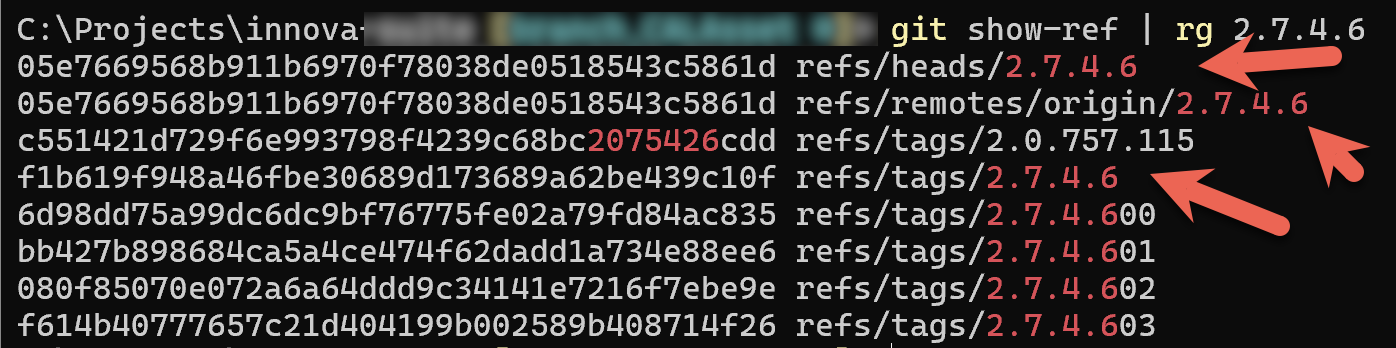
My tag appears 3 times.
The problem here seems to be that there is a tag and a branch, both named 2.7.4.6
I can restrict the search to tags:
git tag | rg 2.7.4.6
Which returns what I expect.

I can then try the branches:
git branch --all | rg 2.7.4.6

And there is our culprit.
There is a branch with the same name, which is almost certainly a mistyped command, since we use a specific naming convention for branches and tags.
Cleanup is simple enough.
First, delete the local branch.
git branch -d 2.7.4.6
Then, delete the remote branch:
git push origin :refs/heads/2.7.4.6
Then, delete the local tag:
git tag -d 2.7.4.6
And finally, delete the remote tag.
git push --delete origin 2.7.4.6
The delete should now succeed.

And now, we should be able to push our tags.

WARNING: Be certain that you know what you want to keep - the local or the remote!
Happy hacking!