Setting The PostgreSQL TimeZone For Client Applications In C# & .NET
[C#, .NET, PostgreSQL]
In our previous post, “Getting the Server Time in PostgreSQL From A Client In A Different Timezone in C# & .NET”, we looked at how to get the server time in PostgreSQL and have it correctly displayed in the timezone of the client.
The code was like so:
using (var cn = new NpgsqlConnection("host=localhost;username=myuser;password=mypassword;database=postgres;Timezone=America/Lima"))
{
  // Get the timezone for Lima, Peru
  var limaTimeZome = TimeZoneInfo.FindSystemTimeZoneById("America/Lima");
  // Fetch date and time from server
  var dateTime = cn.QuerySingle<DateTime>("SELECT now()");
  // Print what we get from the server
  Console.WriteLine($"Time on database server: {TimeOnly.FromDateTime(TimeZoneInfo.ConvertTime(dateTime, limaTimeZome))}");
  // Print the actual time in Lima
  Console.WriteLine($"Time in Lima: {TimeOnly.FromDateTime(TimeZoneInfo.ConvertTime(DateTime.UtcNow, limaTimeZome))}");
}
Which works ok.
The problem with this approach is that you have to keep setting the timezone at the connection level, which can be a source of bugs if you don’t maintain centralized connection strings.
A solution to this is to have the timezone set at application level.
Let us look at a sample web API:
var builder = WebApplication.CreateBuilder(args);
builder.Services.AddSerilog();
var app = builder.Build();

app.MapGet("/", () =>
{
    using (var cn = new NpgsqlConnection("host=localhost;username=myuser;password=mypassword;database=postgres"))
    {
        var serverTime = cn.QuerySingle<TimeOnly>("SELECT now()::time");
        var clientTime = TimeOnly.FromDateTime(DateTime.Now);
        Log.Information("Time on database server: {ServerTime}", serverTime);
        Log.Information("Time locally: {ClientTime}", clientTime);
        return Results.Ok(new { ServerTime = serverTime, ClientTime = clientTime });
    }
});

await app.RunAsync();
If we run this code we get the following result:
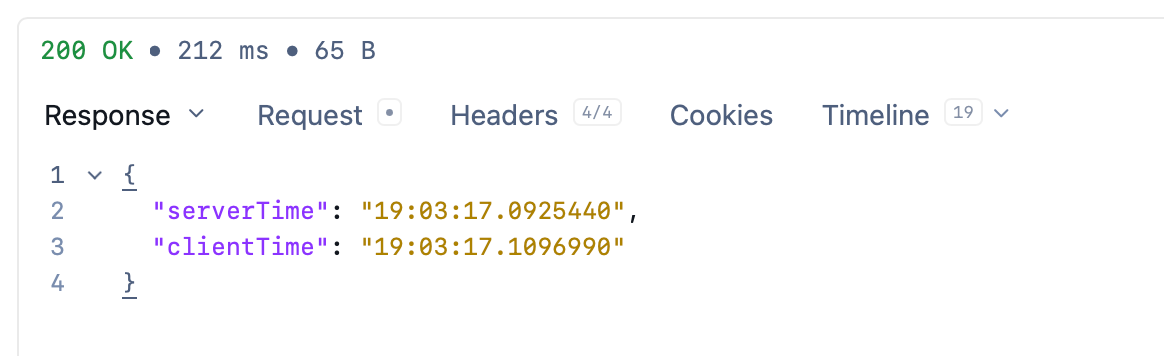
Suppose we wanted to simulate that the client is in a different time zone, say Lima, Peru?
We can make use of the fact that the PostgreSQL client driver supports the PGTZ environment variable.
There are several ways to set it, but the simplest is to set it in the launchSettings.json file.
By default, it looks like this:
{
  "$schema": "https://json.schemastore.org/launchsettings.json",
  "profiles": {
    "http": {
      "commandName": "Project",
      "dotnetRunMessages": true,
      "launchBrowser": true,
      "applicationUrl": "http://localhost:5076",
      "environmentVariables": {
        "ASPNETCORE_ENVIRONMENT": "Development",
      }
    },
    "https": {
      "commandName": "Project",
      "dotnetRunMessages": true,
      "launchBrowser": true,
      "applicationUrl": "https://localhost:7250;http://localhost:5076",
      "environmentVariables": {
        "ASPNETCORE_ENVIRONMENT": "Development"
      }
    }
  }
}
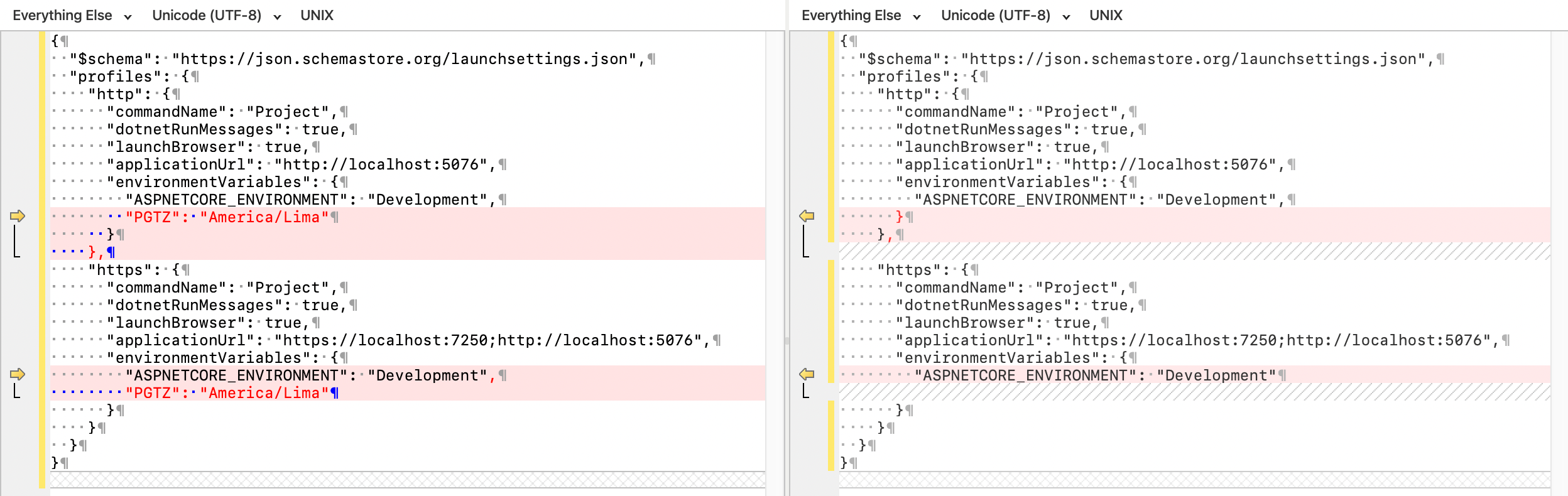
We can update it to look like this:
{
  "$schema": "https://json.schemastore.org/launchsettings.json",
  "profiles": {
    "http": {
      "commandName": "Project",
      "dotnetRunMessages": true,
      "launchBrowser": true,
      "applicationUrl": "http://localhost:5076",
      "environmentVariables": {
        "ASPNETCORE_ENVIRONMENT": "Development",
        "PGTZ": "America/Lima"
      }
    },
    "https": {
      "commandName": "Project",
      "dotnetRunMessages": true,
      "launchBrowser": true,
      "applicationUrl": "https://localhost:7250;http://localhost:5076",
      "environmentVariables": {
        "ASPNETCORE_ENVIRONMENT": "Development",
        "PGTZ": "America/Lima"
      }
    }
  }
}
The difference is here:
If we now run the app, we get the following:
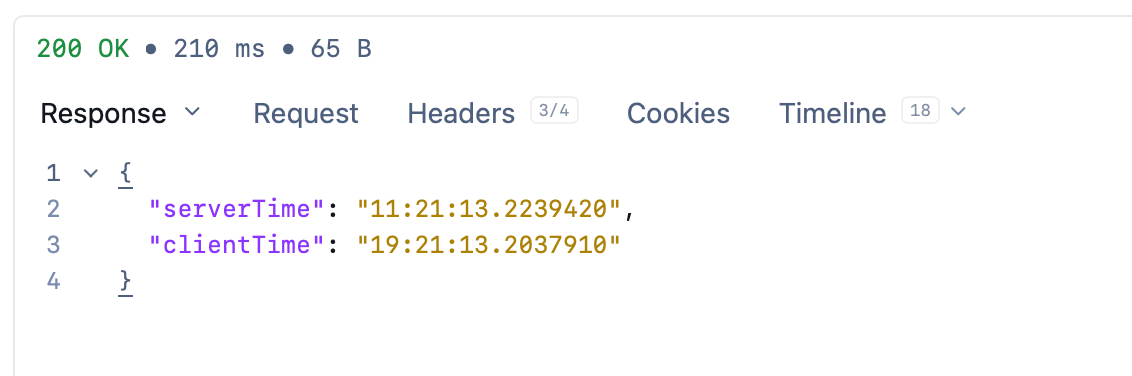
We can see here that the timezone at the client is respected.
TLDR
You can set the timezone for the connecting client application globally using the PGTZ environment variable.
The code is in my GitHub.
Happy hacking!