
Posting A Message to Microsoft Teams Via WebHook In C# & .NET
[C#, .NET, Microsoft Teams]
In a previous post, “Posting Messages To Microsoft Teams With Code”, we looked at how to post a message to Microsoft Teams in C#.
However, as outlined in this post, “Configuring Microsoft Teams Webhooks for Channels”, significant changes have occurred in the architecture and model of Microsoft Teams integration, and not it is powered by PowerAutomate.
In this post we will look at how to programmatically post a message to Microsoft Teams via webhooks.
The first order of business is to identify the channel that we want to post the message to, and setup the integration as outlined in this post.
Once done you should have a webhook.
It should look something like this:
https://default66d2057410b440c188d6fd84b570a9.g6.environment.api.powerplatform.com:443/powerautomate/automations/direct/workflows/8b149c7870eb402c9963df1bcbd62fc4/triggers/manual/paths/invoke?api-version=1&sp=%2Ftriggers%2Fmanual%2Frun&sv=1.0&sig=PV1Nt2_F8gQxLWIUSjaSMoCM6Lw5JTGPvyR4VYCRZvs
The next order of business is to understand the payload that the webhook expects.
The simplest model is a textblock, whose simplest payload looks like this:
{
  "type": "message",
  "attachments": [
    {
      "contentType": "application/vnd.microsoft.card.adaptive",
      "content": {
        "type": "AdaptiveCard",
        "version": "1.2",
        "body": [
          {
            "type": "TextBlock",
            "text": "WANTAM!"
          }
        ]
      }
    }
  ]
}
Rather than manipulate this unwieldy text, you can use anonymous types and some constants to get the same effect:
First, we define our constants;
const string MessageType = "message";
const string CardContentType = "application/vnd.microsoft.card.adaptive";
const string CardType = "AdaptiveCard";
const string CardVersion = "1.2";
const string CardBodyType = "TextBlock";
Then we build our anonymous type.
var request = new
{
	type = MessageType,
	attachments = new[]
	{
		new
		{
			contentType = CardContentType,
			content = new
			{
				type = CardType,
				version = CardVersion,
				body = new[]
				{
					new
					{
						type = CardBodyType,
						text = $"{message}"
					}
				}
			}
		}
	}
};
This request is then posted via a HttpClient to Microsoft Teams.
We can wrap everything into a tidy class as follows:
public sealed class TextNotifier
{
    private const string MessageType = "message";
    private const string CardContentType = "application/vnd.microsoft.card.adaptive";
    private const string CardType = "AdaptiveCard";
    private const string CardVersion = "1.2";
    private const string CardBodyType = "TextBlock";

    private readonly string webhook;

    public TextNotifier(string webhook)
    {
        this.webhook = webhook;
    }

    public async Task<bool> Post(string message)
    {
        var request = new
        {
            type = MessageType,
            attachments = new[]
            {
                new
                {
                    contentType = CardContentType,
                    content = new
                    {
                        type = CardType,
                        version = CardVersion,
                        body = new[]
                        {
                            new
                            {
                                type = CardBodyType,
                                text = $"{message}"
                            }
                        }
                    }
                }
            }
        };

        var client = new HttpClient();
        // Set our headers
        client.DefaultRequestHeaders.Accept.Add(new MediaTypeWithQualityHeaderValue(MediaTypeNames.Application.Json));
        // Serialize anonymous type to JSON
        var adaptiveCardJson = JsonSerializer.Serialize(request);
        // Create content for posting
        var content = new StringContent(adaptiveCardJson, System.Text.Encoding.UTF8, MediaTypeNames.Application.Json);
        // Post
        var response = await client.PostAsync(webhook, content);
        // Return success
        return response.IsSuccessStatusCode;
    }
}
Here we can see a couple of things:
- We create our request as an anonymous type
- We create a
HttpClientand set some default headers - We serialize our request to
json - We create StringContent from our json
- We post to the webhook
- We check if the result is a success
We then write tests for this:
public class TextNotifierTests
{
    [Fact]
    public async Task Teams_Client_Should_Post_With_Valid_WebHook()
    {
        var client = new TextNotifier(Constants.ValidTeamsWebHook);
        var result = await client.Post("WANTAM");
        result.Should().BeTrue();
    }

    [Fact]
    public async Task Teams_Client_Should_Fail_With_InValid_WebHook()
    {
        var client = new TextNotifier(Constants.InValidTeamsWebHook);
        var result = await client.Post("WANTAM");
        result.Should().BeFalse();
    }
}
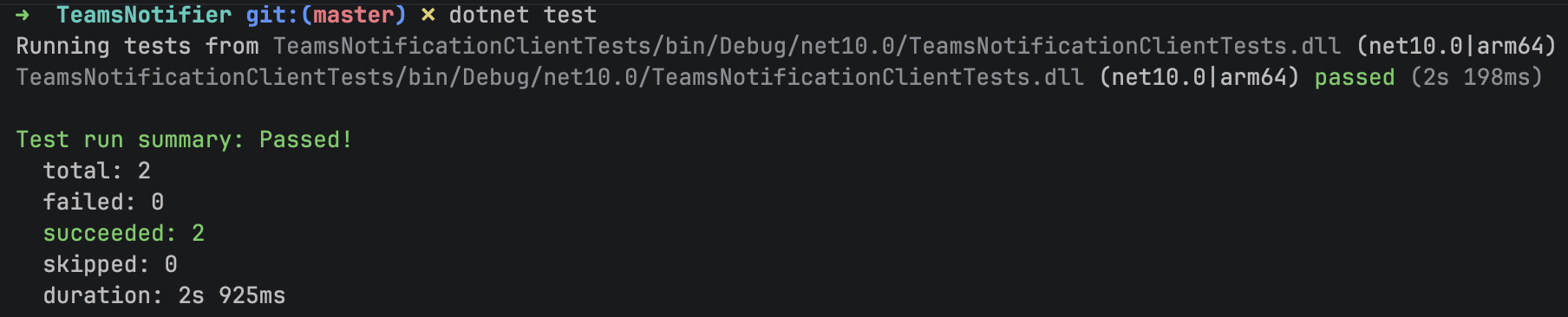
Our tests should succeed.
Upon further examination, we can simplify the posting of our request and replace this code:
var client = new HttpClient();
// Set our headers
client.DefaultRequestHeaders.Accept.Add(new MediaTypeWithQualityHeaderValue(MediaTypeNames.Application.Json));
// Serialize anonymous type to JSON
var adaptiveCardJson = JsonSerializer.Serialize(request);
// Create content for posting
var content = new StringContent(adaptiveCardJson, System.Text.Encoding.UTF8, MediaTypeNames.Application.Json);
// Post
var response = await client.PostAsync(webhook, content);
// Return success
return response.IsSuccessStatusCode;
With this:
// Create a HttpClient
var client = new HttpClient();
// Post the request
return client.PostAsJsonAsync(webhook, request);
Here we are making use of the fact that the PostAsJsonAsync extension method already knows how to post an object directly and handle the serialization of the same.
We this no longer need to serialize the object to json and convert into StringContent.
Our final code looks like this:
using System.Net.Http.Json;

namespace TeamsNotificationClient;

public sealed class TextNotifier
{
    private const string MessageType = "message";
    private const string CardContentType = "application/vnd.microsoft.card.adaptive";
    private const string CardType = "AdaptiveCard";
    private const string CardVersion = "1.2";
    private const string CardBodyType = "TextBlock";

    private readonly string webhook;

    public TextNotifier(string webhook)
    {
        this.webhook = webhook;
    }

    public async Task<bool> Post(string message)
    {
        var request = new
        {
            type = MessageType,
            attachments = new[]
            {
                new
                {
                    contentType = CardContentType,
                    content = new
                    {
                        type = CardType,
                        version = CardVersion,
                        body = new[]
                        {
                            new
                            {
                                type = CardBodyType,
                                text = $"{message}"
                            }
                        }
                    }
                }
            }
        };

        // Create a HttpClient
        var client = new HttpClient();
        // Post the request
        var response = await client.PostAsJsonAsync(webhook, request);
        // Return success
        return response.IsSuccessStatusCode;
    }
}
Finally, we can invoke this as follows:
const string TestWebHook = "INSERT YOUR WEBHOOK FROM TEAMS HERE";
var client = new TextNotifier(TestWebHook);
var result = await client.Post("WANTAM");
The variable result will be true for success, and false otherwise.
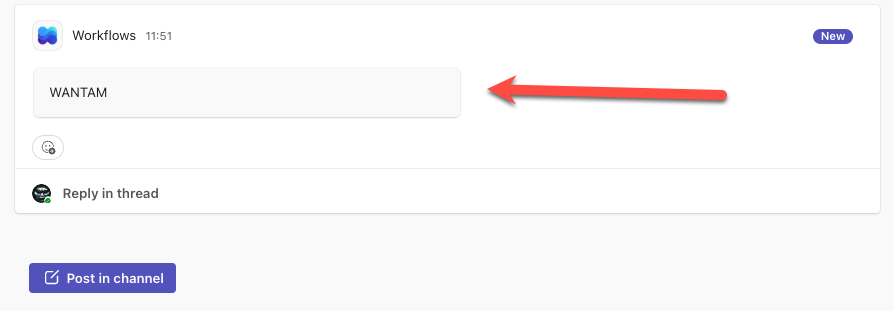
If all goes well, we should see the following in the Microsoft Teams channel.
TLDR
You can programmatically post to Microsoft Teams Channels via webhook using anonymous types and a HttpClient
The code is in my GitHub.
Happy hacking!